|
|
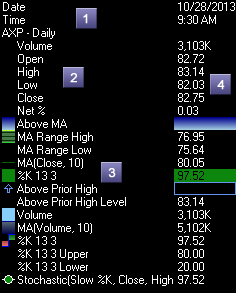
The tracker cell displays overlay information for the active area of the cell under the mouse cursor. The information updates as the mouse cursor moves. The parts of the cell are detailed below:
1 - Caption Area - Displays captions for the active set of items. 2 - Sub items are indented to the right from the parent item. 3 - Items may be preceded by a square indicating the overlay type and colors at the current tracking bar. 4 - Value Area - Displays the item value at the current tracking bar.
For further information on the tracker cell, please consult the following topics:
|
|