|
|
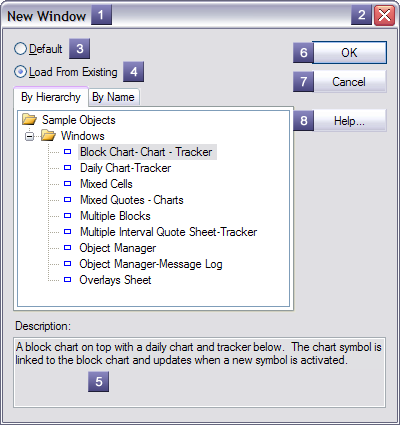
The new object form allows creating a new named object using default settings or loaded from a named object in the object library. The parts of a sample form are detailed below:
1 - Caption - Describes the object type being created. 2 - Close Button - Closes the form canceling creation of a new object. 3 - Default - If selected, a new object will be created using default settings. 4 - Load From Existing - If selected, a new object will be created using settings loaded from a named object in the object library. 5 - Description - Description of currently selected object. 6 - OK Button - Closes the form and attempts to create a new object of the selected type. If Load From Existing is selected and a valid object is not selected, the button is not available. 7 - Cancel Button - Closes the form canceling creation of a new object. 8 - Help Button - Launches the application help system displaying this help topic. |
|