|
|
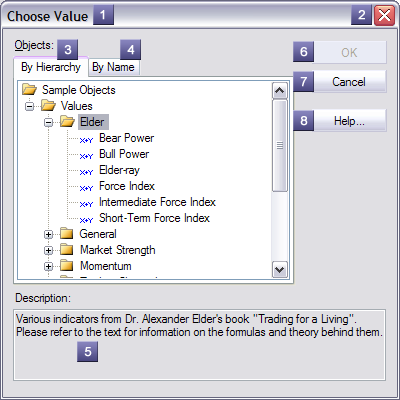
The choose object form allows picking a named object from the object library. The parts of a sample form are detailed below:
1 - Caption - Describes the object type being chosen. 2 - Close Button - Closes the form canceling choosing an object. 3 - By Hierarchy - Displays a tree of available named objects as they appear in the object library. Only objects of the allowed type and style are displayed. Navigating the object tree is identical to navigating the object manager object tree. 4 - By Name - Displays an alphabetical list of available named objects. Duplicate names will appear with their parent group names to help differentiate the objects. Only objects of the allowed type and style are displayed. 5 - Description - Description of currently selected object. 6 - OK Button - Closes the form updating the object reference to the selected object. If a valid object is not selected, the button is not available. 7 - Cancel Button - Closes the form canceling choosing an object. 8 - Help Button - Launches the application help system displaying this help topic.
|
|